
Inspector Gadget is a tool to help SOCs scale and automate augmention of alerts. Whether that’s through an analyst leveraging Inspector Gadget directly, or through a Security Orchestration, Automation and Response (SOAR) platform.
It’s a proxy API endpoint, that can communicate to other API endpoints. This means that given a particular Indicator of Attack (IOA), it can connect to multiple API endpoints for third party services to provide more information and context around it, and help make a better assessment to the validity or malicious nature of it.
It’s built upon FastAPI and httpx, meaning it’s designed with parallelism in mind, then thanks to Celery/Redis it can scale to meet your demands while still maintaining that quick response. Even the core library that maps indicator types to third party API endpoints (ioclib) is built with asynchronous actions for speed.
It has a rich AAA structure - Authentication through OAuth, Authorisation thanks to user contexts (allowing you to create administrators, users who can query endpoints and users who can read the results), and an accounting component. Including report generation to track data usage.
Features Include:
- FastAPI and Celery for Asynchronous and distributed usage for scaling
- An Administrative Portal for tracking and auditing usage
- OAuth for verification and access
- Openapi.json for easy documentation access
WARNING: This started off as a simple experiment to automate some work, and play around more with FastAPI, PostGreSQL, Celery and Redis - it’s functional and accomplishes its task, but there’s obviously more work that could go into it to improve it. It’s also open source and free, so a great starting base for SOCs that are looking to develop automation internally.
Architecture #
The below diagram shows how it works. It can be run entirely out of a single Docker container, or thanks to Celerey and Redis can be scaled up with each third party API endpoint being a different container.
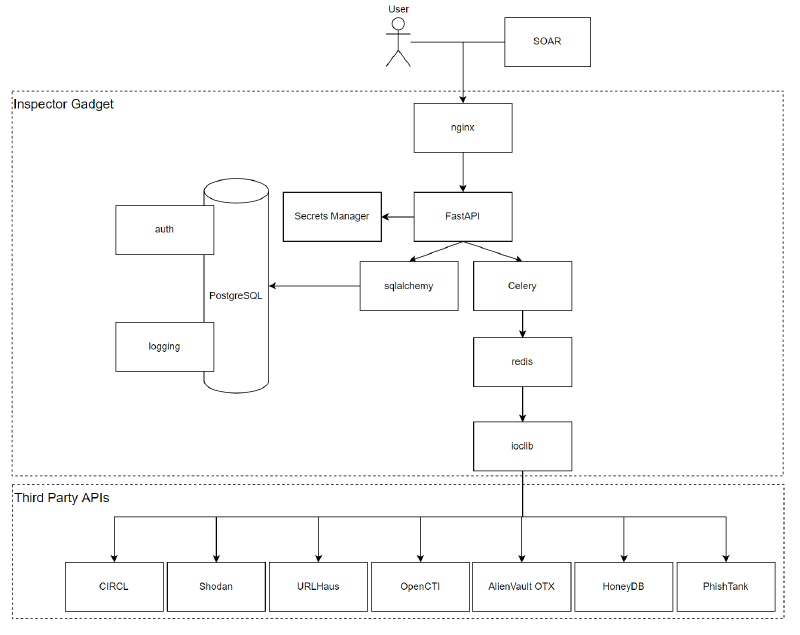
With FastAPI being asynchronous, and ioclib being built on top of httpx for asynchronous calls it can bring back a huge amount of data in a short timeframe.
PostGreSQL Database Schema #
The database uses two tables, the auth table for detailing accounts, and the logging table for tracking usage. Both need to be created by default. The schema’s that are used to create them our outlined below:
auth:
CREATE TABLE auth (
      id uuid PRIMARY KEY DEFAULT uuid_generate_v4(),
      username text NOT NULL UNIQUE,
      password text NOT NULL,
      account_active BOOLEAN NOT NULL DEFAULT FALSE,
      account_admin BOOLEAN NOT NULL DEFAULT FALSE,
      created_date timestamptz NOT NULL DEFAULT NOW()
);
COMMENT ON COLUMN auth.id IS 'Unique UUID';
CREATE INDEX auth_username_index ON auth (username);
logging:
CREATE TABLE logging (
      id uuid PRIMARY KEY DEFAULT uuid_generate_v4(),
      username text NOT NULL REFERENCES auth(username),
      api text NOT NULL,
      data_size integer NOT NULL DEFAULT 0,
      endpoint text NOT NULL,
      parameters text NOT NULL,
      user_agent text NOT NULL,
      ip_address text NOT NULL,
      query_date timestamptz NOT NULL DEFAULT NOW()
);
Once created you will need to specify the connection string in sql_app/database.py, specifically replacing the below variable with the correct details for your PostGresDB.
SQLALCHEMY_DATABASE_URL = "postgresql://postgres:password@localhost/gadgetapp"Security Credentials and Tokens #
While there is a default password for the root account for the system, it’s advised that this be changed and updated. To commence that you need to run the following python code from a console to generate a new password:
>>> from passlib.context import CryptContext
>>> pwd_context = CryptContext(schemes=['bcrypt'], deprecated='auto')
>>> pwd_context.hash('P@ssw0rd')
Then you need to update the user account from the SQL database itself:
INSERT INTO auth(username, password, account_active, account_admin)
VALUES('root','$2b$12$bOHQebYyCOt1gTPFpcX6s.3/7KePJ/Gj2kwRU4DNqa8ER421.D276',true,true)
You will also need to generate the random 32 byte hex key that’s used as the OAuth Secret key, you can use the following linux command to generate something for use:
openssl rand -hex 32The API endpoint keys, and OAuth information are referenced in utils/secrets.py - it’s heavily advised to store the Secret Keys in environment variables, and reference these from this folder.
Celery and Redis #
Make sure that celery and redis are running, as it’s required by IOCLib for the distributed and asynchronous calls to endpoints.
Starting Server #
You can start the python component with the following command, it’s highly recommended that this is proxied behind something like nginx.
gunicorn test:app --workers 4 --worker-class uvicorn.workers.UvicornWorker --bind 0.0.0.0:8000 --proxy-headersAPI Endpoints #
The current endpoints are listed in the http://inspectorgadget.local/docs - The swagger documentation will be displayed, which will show the endpoints that can be queried, and allow you to test them to see the kind of information that’s returned.
| Endpoint | Scope | Description |
|---|---|---|
/api/authenticate |
All | Generate a JWT token to authenticate further queries |
/api/status |
All | Indicates if logged in and status of site |
/api/me |
User | Similar to the status page |
/api/me/password |
User | Used for changing your own user password |
/api/me/usage |
User | Provides a usage report (by default the last month), for accounting queries. |
/api/admin/user |
Mon | Creates a new user account |
/api/admin/user/password |
Mon | Changes a users password |
/api/admin/user/status |
Mon | Enable or Disable a user |
/api/admin/logs |
Mon | Get information about all users, including last authentication IP Address, User Agent and mores |
/api/admin/log/{username} |
Mon | Get information about a user, including last authentication IP Address, User Agent and more |
/api/admin/reports |
Mon | Generate a usage report for all users |
/api/admin/report/{username} |
Mon | Generate a usage report for a provided user |
/api/indicator/ipv4/{ipv4} |
Tasks | Provided an IPv4 address, it’ll return information about it from other API endpoints |
/api/indicator/domain/{domain} |
Tasks | Provided a domain, it’ll return information about it from other API endpoints |
/api/indicator/hash/{sha256} |
Tasks | Provided a SHA256 hash, it’ll return information about it from other API endpoints |
Other APIs #
Currently Inspector Gadget connects to some of the following API endpoints:
- VirusTotal
- AlientVault OTX
- GreyNoise
- Google Safe Browsing
- Shodan
- URLScan
- Triage
- And a bunch more.
As the code is freely available, it’s possible to expand the functionality by adding your own API endpoints. To accomplish this you need to change/remove/add API endpoints edit the relevant file and add a templated function to the relevant IOC type in utils directory. To add a new IOC type, simply create a new file in utils, make sure it inherits from ioc.py, then ensure that it is in both the routes.py and worker.py to be allocated out to a relevate celery worker.
Users and Scopes #
By defult there’s three roles (OAuth scopes) that are used:
- mon: The Auditing panel for monitoring users usage
- users: The panel for accessing user information
- tasks: Lets you execute a request against multiple endpoints
An ordinary user is given the tasks and users scope by default to let them audit their own logs, change their user password and run tasks. An administrator user (marked by account_admin in the PostGres Database table), will let you also view such information about other users and get given the mon scope.
Summary #
Inspector Gadget is a simple tool that can be expanded to meet the needs of a growing SOC, allowing them to automate or augment data to make more accurate assessments. Whether you’re a single analyst, or a following the sun SOC, while this tool is basic in concept, it is built to help speed up your operations.
I’d love to hear feedback, suggestions or usage, so don’t hesitate to reach out with feedback.